About KadazaContactHelpWebsite Selection ProcedureWebmastersOur MissionMobile
Make Kadaza Your Homepage
Your homepage is the website that appears first when you open your internet browser. You can set your own homepage. Choosing the right homepage is very important: the right homepage can give you a much better overview of what the internet has to offer. Kadaza is designed to be used as your homepage, so that you can find all your favourite websites quickly and easily. Choose your browser below for detailed instructions.
Google Chrome
1. Click on the Chrome menu icon in the upper right corner and select Settings.
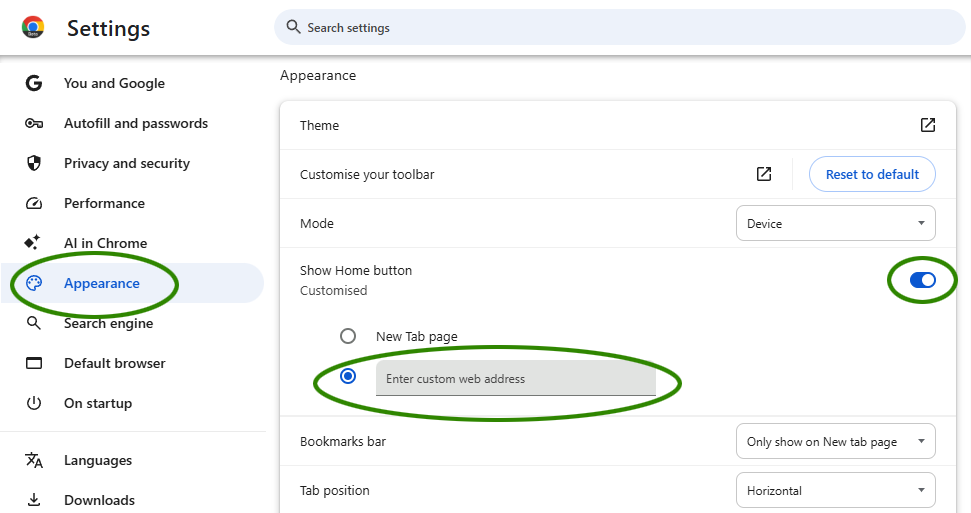
2. Under Appearance, Check Show home button. Enter www.kadaza.in in the Enter custom web address field.
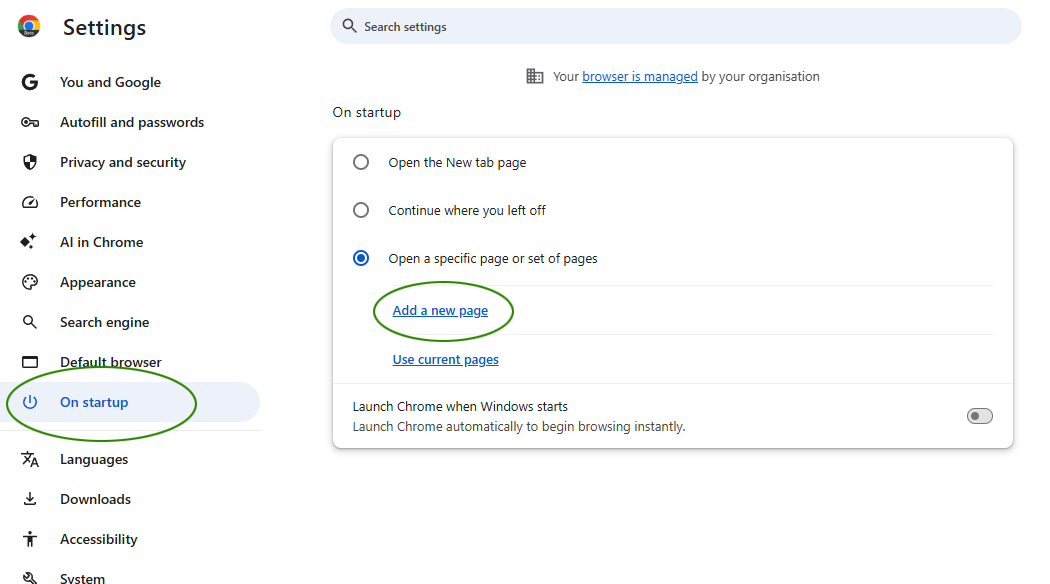
3. Scroll down to the On startup section, check Open a specific page or set of pages. Type www.kadaza.in in the box.
Microsoft Edge
1. In the upper right corner, select Options
and click Settings.
2. In the "Start, home, and new tabs" section select Open these pages. Click "Add a new page" and enter www.kadaza.in. Click save.
3. Activate Show the home button. Click "Enter URL" and enter www.kadaza.in. Click save.
Firefox
1. Click and drag the Kadaza icon below to the home icon located in the upper-left corner of your browser.
2. Click yes in the pop-up box.
Safari
1. Click on Safari in the top Apple menu bar, then select Preferences.

Browser Extensions
Easily install the Kadaza extension for Chrome, Edge or Firefox. This lets you set Kadaza as your start page in just a few clicks, without having to change complicated browser settings.
Install the Kadaza extension for Chrome
Install the Kadaza add-on for Firefox
Install the Kadaza add-on for Edge